
Want to know if your color contrasts are accessible? Our contrast checker shows you the contrast ratio in real time – including WCAG evaluation and preview.
Kontrastverhältnis
21.00 : 1
Heading
Lorem ipsum dolor sit amet, consetetur sadipscing elitr, sed diam nonumy eirmod tempor invidunt ut labore et dolore magna aliquyam erat, sed diam voluptua. At vero eos et accusam et justo duo dolores et ea rebum. Stet clita kasd gubergren, no sea takimata sanctus est Lorem ipsum dolor sit amet.
The contrast ratio between foreground and background color is crucial for accessible colors (or color combinations).
For digital media (e.g., websites, PDFs) to be accessible, they must meet various requirements. One of these requirements concerns the contrast ratio between the colors used. In Europe and many other parts of the world, the WCAG contrast calculation is used for this purpose, which is explained below.
Conversion from HEX to RGB
The WCAG contrast calculation is based on the RGB color model in its numerical RGB representation (e.g., RGB(0, 125, 179)). In the digital world, however, colors are typically available in HEX-encoded form (e.g., #007db3) and must therefore first be converted to RGB values. Since the conversion from HEX to RGB is available as a standard function in most programming languages, the exact formula is not explained further here. Instead, the following table shows the already calculated RGB values for two example HEX colors – for foreground and background respectively.
|
Foreground |
Background |
|
|---|---|---|
|
HEX |
|
|
|
RGB (8-bit) |
|
|
Normalization of RGB values
In the next step, the 8-bit RGB values are transferred from the original value range [0; 255] to the normalized range [0; 1] by dividing each by 255.
|
Foreground |
Background |
|
|---|---|---|
|
RGB (8-bit) |
|
|
|
RGB (normalized) |
|
|
Linearization of color values
So far, you know that the calculation is based on the RGB color model. Now another piece of information is added: WCAG assumes color representation in the sRGB color space. But what does that mean exactly?
The sRGB color space is a standard that precisely defines how individual RGB values are interpreted – that is, how these 3 numbers (e.g., RGB(0, 125, 179)) ultimately appear on the screen, particularly in terms of brightness and color perception.
What many do not know: RGB values are not linear in the sRGB color space. This means that a value of 128 on a scale from 0 to 255 does not correspond to half the brightness of a value of 255.
The reason for this is a so-called gamma encoding, which adapts the values to the perception of the human eye. While this is useful for display on screens, it leads to incorrect results in mathematical calculations – such as determining brightness or contrast ratio.
Therefore, the RGB values must first be linearized (according to IEC/4WD 61966-2-1 – fee-based standard). Only through this step do they correctly reflect the actual light intensity and can be used as a basis for calculating relative luminance.
The RGB values are linearized using the following formula:

|
Foreground |
Background |
|
|---|---|---|
|
RGB (normalized) |
|
|
|
RGB (linear) |
|
|
Calculation of relative luminance
After the sRGB values have been normalized and linearized, we can now calculate their relative luminance according to WCAG. Relative luminance is the brightness of a color, adjusted to human perception. Since the human eye perceives green more intensely than red or blue, for example, the green component of the color is weighted more heavily in the brightness calculation. The scale ranges from 0 (black) to 1 (white).
L = 0.2126∙Rlin + 0.7152∙Glin + 0.0722∙Blin
|
Foreground |
Background |
|
|---|---|---|
|
RGB (linear) |
|
|
|
Luminance |
|
|
Calculation of contrast ratio
From the relative luminances of two colors, the contrast ratio can now be calculated as defined by WCAG:
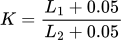
It should be noted that the lighter color L1 is always in the numerator, so that the contrast ratio is consistently always ≥ 1.0.
|
Foreground |
Background |
|
|---|---|---|
|
Luminance |
|
|
|
Contrast ratio |
|
|
The contrast ratio of 4.5 : 1 calculated in this example meets the WCAG AA level. The selected color combination is therefore “accessible colors.”
The term “color contrast” is not clearly defined. Depending on the context (e.g., color theory, photography, fashion, accessible design, etc.), it can refer to very different things. In accessible design, “color contrast” is the colloquial term for the technically clearly defined “contrast.” This is measurable and refers to the brightness difference (luminance) between two colors – completely independent of hue.
The goal is to choose the contrast as high as possible so that all content is easily perceptible and readable.
But be careful: High contrast does not depend on how different colors appear, but solely on their brightness difference. For example, a light and a dark shade of blue can form a very high contrast – even though they are the same hue. Conversely, an intense red next to a strong green can be difficult to read despite a strong color effect if both colors have similar brightness.
The example image shown below clearly illustrates this difference.

Left: Same hue with high brightness contrast and good readability.
Right: Complementary colors with low brightness difference and poor readability.
High color contrasts are particularly important in accessible design because they ensure that content becomes perceptible and operable for everyone. Color contrast is a major factor in determining how well information on a website or in a document can be captured. Especially with digital content, the readability of texts, the recognizability of controls, or the comprehensibility of graphics depend heavily on contrast.
Insufficient contrast can lead to content being overlooked or misunderstood – especially for people with impaired vision. However, users without impairments also benefit from clear contrasts, for example in poor lighting or on mobile devices outdoors.
Therefore, color contrast is not just a design aspect, but a central criterion for digital accessibility and usability.
All content that serves a genuine functional purpose is relevant. This can include texts, images, diagrams, symbols, and controls. However, the contrast between text and background is particularly important, as texts constitute the main content of many websites and documents. Interactive elements such as forms or buttons must also be clearly recognizable in order to be used reliably.
Purely decorative elements or graphics are not included – they have no functional purpose and therefore do not need to meet minimum contrasts.
Minimum contrasts in accessible design are primarily intended to support people with impaired vision – such as age-related vision loss, cataracts, or color vision deficiency such as red-green color blindness.
However, people without visual impairments also benefit enormously. Ask yourself: Have you ever had difficulty recognizing content on a display in strong sunlight? High color contrast can make the difference even in such everyday situations.
Therefore: Color contrast plays a major role not only in accessible design – high contrast optimizes usability for everyone!
Insufficient color contrast between foreground and background can significantly impair perception and readability – even for people without visual impairments. Content that needs to be quickly captured or interactive is particularly affected.
Disadvantages of poor contrast ratio:
- Poor readability of body text, especially at small font sizes
- Increased cognitive load and faster fatigue when reading
- Errors in data entry, e.g., in forms
- Higher risk of overlooking content (e.g., buttons, links, error messages)
- Important call-to-actions (e.g., “Buy now” in light gray on white) may not be perceived – which can directly lead to loss of revenue
- Higher bounce rate, especially on mobile devices or in difficult lighting conditions
- Exclusion of people with visual impairments
- Possible legal violation (BFSG and BITV)
- Accessible labels or certification marks (e.g., BITV certification) cannot be achieved
Sufficient color contrast not only improves accessibility, but also generally increases the usability and visual clarity of content – on all devices and for all user groups.
Advantages of good contrast ratio:
- Better readability of texts in all font sizes
- Lower cognitive load and better user satisfaction
- Higher visibility of important elements such as buttons or links
- Safer and faster operation of forms and interactive areas
- Positive impact on dwell time, conversion rate, and user retention
- Improved usability in unfavorable lighting conditions (e.g., sunlight)
- Accessibility for people with visual impairments
- Legal compliance
Despite clear technical definitions and guidelines around color contrast, some misconceptions persist stubbornly in practice – especially in design processes. The following statements sound familiar, but often lead to non-accessible results:
- “Light gray is modern” → That is true – but only if the contrast is sufficient. Fashionable design must not come at the expense of readability.
- “Contrast is a matter of taste” → No – contrast is clearly measurable and objectively verifiable according to WCAG.
- “My target audience has good vision” → Accessible design does not only offer advantages for people with visual impairments. It increases usability for everyone.
- “That is just a design question.” → No – color contrast affects not only aesthetics, but also the perceptibility and usability of content.
These and similar statements quickly lead to contrast requirements being underestimated or ignored – with negative consequences for usability and accessibility.